eSubmission of Warranty
Detailed description of API:
Interface currently available for DMS development in:- NAFTA
Version & Updates
| Version | Revision Date | Revision History |
|---|---|---|
| 1.0 | 10th Aug 2023 | New Release |
| 1.1 | 11th Apr 2024 | Updated the Feature name to eSubmission of Warranty. Updated the Defect Failure code API response structure. |
| 1.2 | 22nd Aug 2024 | Updated response codes |
| 1.3 | 18th Aug 2024 | Updated case sensivity, attached claim submission attribute file. |
Overview
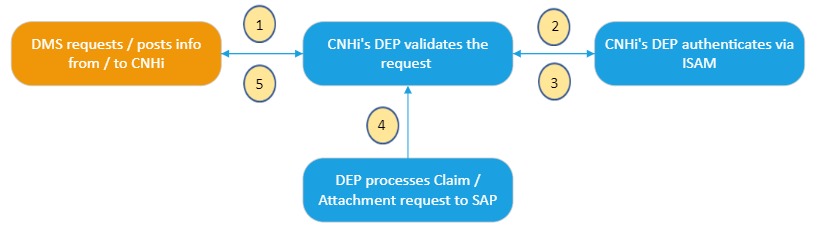
There are three sub-functions within the Warranty Claim eSubmission API:
- Create Warranty Claims:
Used to initiate a claim request in the CNHi eWarranty system in real-time from the DMS application
-
Claims Attachments:
Used to pass additional attachments (PDF/images) associated with the claim. The same claim number that is generated by the “Create Warranty Claims” is sent as an input to this API. This is currently non mandatory, in future for certain claim types this claim attachment API will be required to send additional documentation
-
Defect Failure Code Lookup:
Used to search and retrieve the Defect codes and Failure codes needed to complete an eWarranty Claim before submission
Pre-requisites
- Dealer must use their Dealer Portal credentials to authorize API call.
- Each DMS provider will have a subscription_key assigned by CNHi team, please reach out to dlnadmssupport@cnh.com for assistance
- Each Subscription key is unique to DMS and the environment it belongs to
- Based on the payload (XML/JSON), user to pass the content-type in the header
Authentication
- DMS will pass Basic auth in HTTP header with username/password
- Each DMS provider will have a subscription_key assigned by CNHi team, please reach out to dlnadmssupport@cnh.com for assistance
- The UserID and Password will be set up in the Dealer Portal by the Dealer uniquely for DMS access to interfaces
- DEP API will require subscription_key in HTTP header to identify client
API Format
- REST
- SOAP
The DEP takes care of the format transformations (as needed) to process the request and provide a response to the DMS system. REST format is always suggested for greater simplicity.
Connection Details
CNHi provides two environments:
- CERT / UAT
- Production
Create Claim API
Using the CNHi eSubmission - Create Claim API, DMSs can submit a real-time requests to create a Warranty Claim
| Environment | URL | API | Request Type |
|---|---|---|---|
| CERT/UAT | https://{base_url}/external/services/warrantyclaim_esubmission/v1 | SOAP | POST |
| https://{base_url}/external/services/warrantyclaim_esubmission/v2 | REST | POST | |
| Production | https://{base_url}/external/services/warrantyclaim_esubmission/v1 | SOAP | POST |
| https://{base_url}/external/services/warrantyclaim_esubmission/v2 | REST | POST |
Warranty Claim eSubmission Attributes
Download Warranty Claim Submission AttributesXML Request Body Sample
Download Create Claim XML Sample Request BodyJSON Request Body Sample
Download Create Claim XML Sample Request BodyResponse Description
| Name | Type | Description |
|---|---|---|
| ClaimResponse | Object | Claim Response |
| ClaimResponse.DealerCode | String | Dealer Code |
| ClaimResponse.WorkshopCode | String | Workshop Code |
| ClaimResponse.DmsClaimNumber | String | DMS Claim Number |
| ClaimResponse.JobOrderNumber | String | Job Order Number |
| ClaimResponse.ReferenceDate | String | Reference Date |
| ClaimResponse.CnhClaimNumber | String | CNH Claim Number |
| ClaimResponse.SerialNumber | String | Serial Number |
| ClaimResponse.VanCode | String | Van Code |
| ClaimResponse.DealerName | String | Dealer Name |
| ClaimResponse.Status | String | Status |
| ClaimResponse.StatusDescription | String | Status Description |
| ClaimResponse.ClaimedValue | String | Claimed Value |
| ClaimResponse.ReimbursedValue | String | Reimbursed Value |
| ClaimResponse.Currency | String | Currency |
| ClaimResponse.Message | Object | Message |
| ClaimResponse.Message.item | Array | Message Item |
| ClaimResponse.Message.item.RowNumber | String | Row Number |
| ClaimResponse.Message.item.RowText | String | Row Description |
XML Response Sample
Download Create Claim XML Response SampleJSON Response Sample
Download Create Claim JSON Response SampleClaim Processing / Attachment API
This is used to pass additional attachments (PDF/images) associated with the claim. The same claim number that is generated by the Create Claim API is sent as an input to this API.
- Claim Attachment POST API can upload an attachment (document or image) for submitted claim.
- Claim Attachment GET API can retrieve the same attachment using required parameters (like attname, atttype and objkey).
| Environment | URL | API | Request Type |
|---|---|---|---|
| CERT/UAT | https://{base_url}/external/services/warrantyclaim_esubmission/v2/claimattachment | REST | POST |
| https://{base_url}/external/services/warrantyclaim_esubmission/v2/claimattachment | REST | GET | |
| Production | https://{base_url}/external/services/warrantyclaim_esubmission/v2/claimattachment | REST | POST |
| https://{base_url}/external/services/warrantyclaim_esubmission/v2/claimattachment | REST | GET |
Request Description
Note: All Request Query Parameters are case sensitive.| Name | Params Type | Type | Is Required | Comments |
|---|---|---|---|---|
| attname | Query | string | false | Name of the attachment |
| sap-client | Query | string | false | Sap-Client (fixed value "602") |
| atttype | Query | string | false | Media Type (jpeg or pdf) |
| objkey | Query | string | false | CNH Claim number |
Request Body
| Method | Name | Type | Description | |
|---|---|---|---|---|
| POST | Request Body | "Image/jpeg" or “application/pdf" | Required attachment should be uploaded as image or document in the request body. It can be "image/jpeg" for an image, "application/pdf" for a pdf document. | |
| GET | Request Body | Request body not required |
Response Description
    {
    "statuscode": "200",
    "message": "Claim Processing Completed."
    }
| Status Code | Message |
|---|---|
| 200 | "Claim Processing Completed." |
Sample PDF Claim Attachment Request
Download Claim Attachment PDF SampleSample JPEG Claim Attachment Request
Download Claim Attachment JPEG SampleDefect Failure Code API
This is used to search and retrieve the Defect and Failure codes needed to complete an eWarranty Claim before submission.
| Environment | URL | API | Request Type |
|---|---|---|---|
| CERT/UAT | https://{base_url}/external/services/warrantyclaim_esubmission/v1/defectfailure | SOAP | POST |
| https://{base_url}/external/services/warrantyclaim_esubmission/v2/defectfailure | REST | POST | |
| Production | https://{base_url}/external/services/warrantyclaim_esubmission/v1/defectfailure | SOAP | POST |
| https://{base_url}/external/services/warrantyclaim_esubmission/v2/defectfailure | REST | POST |
XML Request Body Sample
Download Defect Code XML Sample Request BodyJSON Request Body Sample
Download Defect Code JSON Sample Request BodyResponse Description
| Name | Type | Description |
|---|---|---|
| ZcnWtClaimLookupEw20Response.ToutDefect | Object | Defect |
| ZcnWtClaimLookupEw20Response.ToutDefect.Item.Code | String | Defect Code |
| ZcnWtClaimLookupEw20Response.ToutDefect.Item.Description | String | Defect Description |
| ZcnWtClaimLookupEw20Response.ToutFailure | Object | Failure |
| ZcnWtClaimLookupEw20Response.ToutFailure.Item.Code | String | Failure Code |
| ZcnWtClaimLookupEw20Response.ToutFailure.Item.Description | String | Failure Description |
| ZcnWtClaimLookupEw20Response.ToutMaterial | Object | Material |
| ZcnWtClaimLookupEw20Response.ToutMaterial.Item.MatCode | String | Material Code |
| ZcnWtClaimLookupEw20Response.ToutMaterial.Item.MaterialDescription | String | Material Description |
| ZcnWtClaimLookupEw20Response.ToutOperation | Object | Operation |
| ZcnWtClaimLookupEw20Response.ToutOperation.Item.MatCode | String | Failure Code |
| ZcnWtClaimLookupEw20Response.ToutOperation.Item.MaterialDescription | String | Failure Description |
XML Response Sample
Download Defect Failure XML Response SampleJSON Response Sample
Download Defect Failure JSON Response SampleResponse Codes
| Status Code | Message |
|---|---|
| 200 | Claim Processing Completed. |
| 400 | 1. Required request body missing error! |
| 2. Invalid Content-Type / format | |
| 3. Invalid json format in the request body! | |
| 4. Invalid json format in the request body! | |
| 5. E Please Check - User Is Not Setup as Active in Customer_CS table | |
| 6. E Dealer does not have sales area for this product. | |
7. E Invalid Vehicle Hours {Submitted Vehicle Hours}, not coherent with mean point hours {valid Hours} | |
| 500 | Internal Server Error |
| 401 | Access denied due to invalid credentials! |